
Become a Cleaner
Offer cleaning services in your area.
Review offers, choose your jobs and track your earnings in the app.

Create your profile
Add your contact details, experience and the hours you want to work.
01 / 06
Verify your identity
Add a valid piece of ID to your application.
Your background check
A background check is required before you can accept cleaning jobs.
Your experience
Tell us which types of cleaning you do and which services you want to offer.
Your insurance
Add your proof of liability insurance and its expiry date.
Application approved
Once approved, turn on your availability to review and choose offers.
Choose
your availability.
Enter the cities where you work and the cleaning services you want to offer.
Available for a clean now? Turn on your immediate availability to receive requests in your area. You can also review visits planned for later and choose those that fit your schedule.
The planned in-app schedule will let you enter your usual hours. You still review and accept each job: turning on availability does not book a clean for you.
See how to choose a jobAccept the jobs
that suit you.
Browse Now and Later offers. Before accepting, review the cleaning service, tasks and booked extras.
- Check the area, time and estimated duration.
- Review the estimated payout and quote details.
- Find your accepted cleans in your schedule.
Immediate cleans may include a Now bonus. When offered, it is included in the estimate shown before you accept.
After you accept, the address and access instructions help you get ready for the visit.
See how a cleaning visit works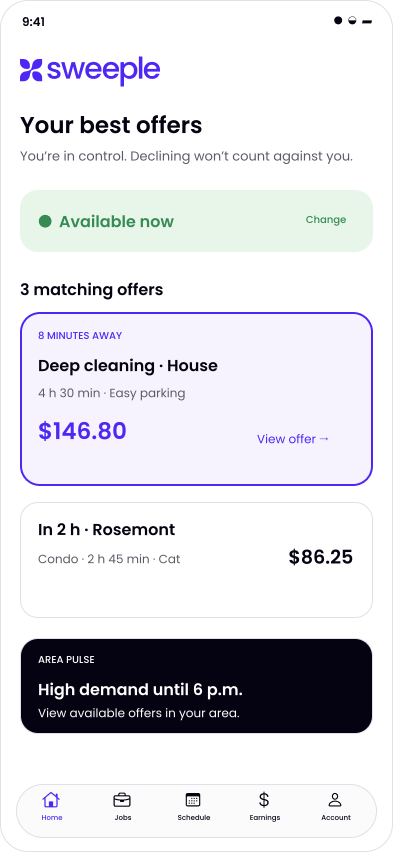
Get ready for the visit
After you accept, find the address and customer instructions in your job. Check access, parking, pets, products and supplies before leaving. Details about delicate surfaces and the customer’s priorities stay with the booking.
Confirm your arrival
Mark your departure and arrival in the app. Inspect the property before starting. If its details do not match the booking, submit a correction and wait for the customer’s decision before continuing.
Follow the tasks for each room
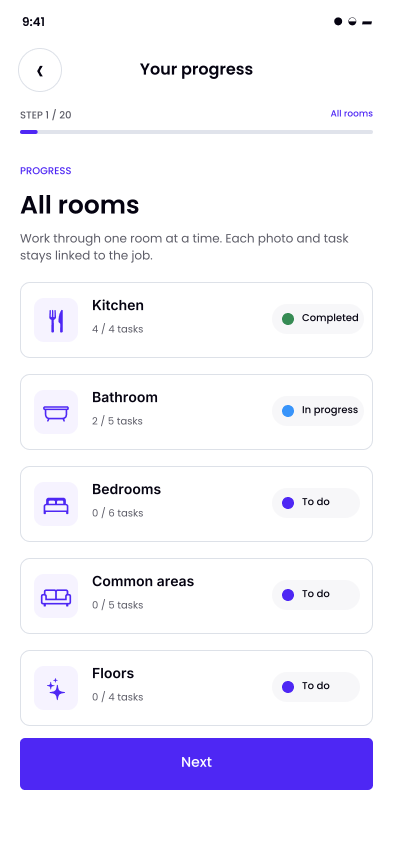
Your task list follows the booked cleaning service, rooms and selected extras. Open a room to review its tasks and instructions. Mark the work you have done: To do, In progress and Completed statuses help you track your progress.
Add the requested photos
The app shows when a before or after photo is needed. With the customer’s consent, photograph only the relevant surfaces. If you cannot take a photo, document the exception. Required tasks still need to be completed.
Check the work before finishing
Review the task summary and photos. Check the final details, supplies and instructions for securing the property, then confirm that the clean is finished. The customer can review the summary and leave a rating.
Read reviews
from your customers.
Once the clean is finished, the customer can review the summary and leave a rating.
Cleaning quality, punctuality, following instructions and communication: feedback helps you see what customers appreciated and where you could improve.
You can read comments and respond to them. If a review seems incorrect, you can ask support to look into it.
Contact the Sweeple team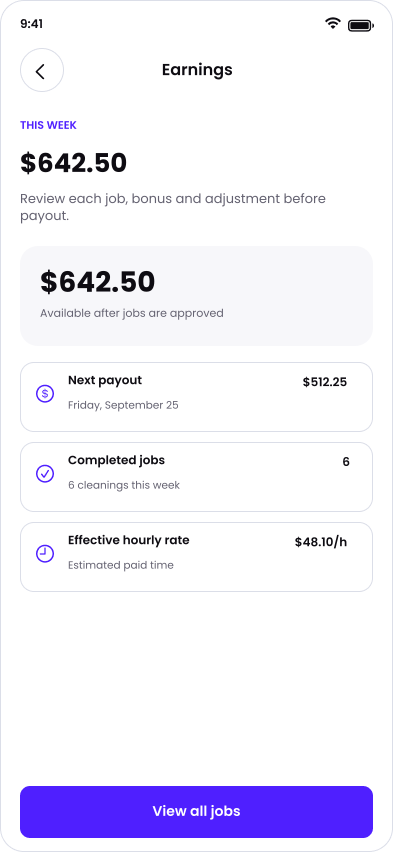
Keep your finances
in one place.
Find completed cleans and their earnings in your history. Review your weekly total and the details of each job.
The planned financial view brings together pending, reserved, available and paid-out amounts. Period views will help you review your earnings from month to month.
Payouts will go through your Stripe Connect payment account, linked to your bank account. Finishing a clean does not mean the funds have reached your bank: the payout status shows their progress.
Timing, any fees and payout conditions will be provided before jobs become available.
Learn about earnings and payoutsPrepare your
tax returns.
Job amounts, fees and taxes each have their place in the financial breakdown.
As a self-employed worker, you keep your income and expense records and file your returns. Taxes charged and amounts paid into your account do not necessarily equal the income you need to report.
Keep your statements and supporting records. The Earnings, payouts and taxes page explains what to check, including GST and QST details and questions to discuss with your accountant.
Read the tax informationFrequently asked
questions
01.What should I check before accepting a job?
02.How does the app guide me during a clean?
03.Is there a bonus for instant cleaning requests?
04.How do I become a Sweeple Cleaner?
05.Is this an employee position?
06.Can I choose my availability and jobs?
07.How can I see what a job pays?
08.How do earnings and payouts work?
Interested in becoming
a Sweeple Cleaner?
See the steps and documents to prepare for your application.